I recently experimented with Microsoft's new Windows 365 for Agents service by building an AI agent to tackle a real-world task, and the results were eye-opening. Within minutes, the platform automatically provisioned two Cloud PCs running Windows 365 to execute my agent’s workflow. Even more impressively, I was able to manage these Cloud PCs just like any other corporate device (via Microsoft Intune), confirming that this approach is not only innovative but enterprise-ready. What follows is a summary of my experience and key insights on running AI agents on a Windows 365 Cloud PC.
Building an Agent to automate a stock-check task
The challenge I addressed was straightforward but common: checking in-store stock availability on a popular UK retailer’s website that offers no API for inventory data. Normally, someone would have to manually visit the site and enter each product number and size, which is time-consuming and ripe for automation. This week, I set out to automate it using an AI-driven approach rather than writing scripts or relying on traditional robotic process automation.
Solution approach: I created a “computer use” agent powered by Claude Sonnet 4.5, Anthropic’s latest large language model specialised for complex, long-horizon tasks and computer operations. Claude Sonnet 4.5 is designed to enable AI agents to use a computer the way a person would, by reading screen content, clicking buttons, typing, and so on. I provided the agent with step-by-step instructions in plain language on how to navigate the retailer’s website, search for specific product IDs and sizes, and retrieve stock status (e.g., “In Stock” or “Out of Stock”).
Windows 365 for Agents: Instead of running on my local machine, the agent was configured to run within Windows 365. Microsoft’s Windows 365 for Agents platform (currently in preview) offers a “Cloud PC pool” for agent workloads.
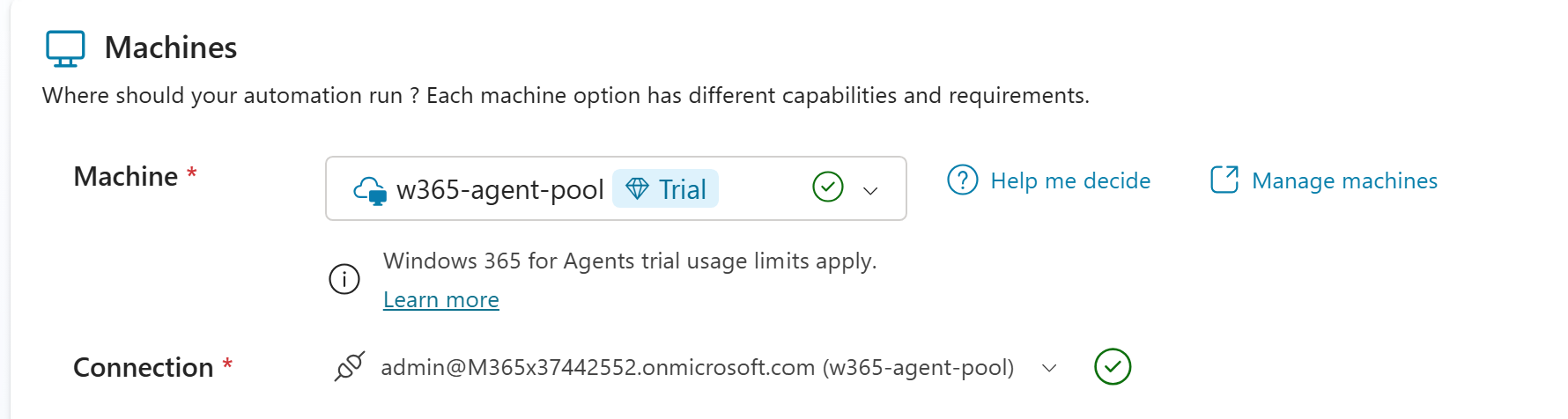
Essentially, it’s a pool of virtual Windows desktops in the Microsoft Cloud, Entra ID joined and managed by Intune, just like regular employee PCs. Agents can “check out” a Cloud PC from this pool when they have work to do, then “check it back in” when finished. This was perfect for my scenario; it meant the AI could perform web interactions in a real Windows desktop environment under the full governance of our enterprise IT policies.
Automatic Cloud PC provisioning: Once I deployed my agent via the Claude-based agent platform, Windows 365 for Agents handled the infrastructure seamlessly. Within about 30 minutes, two Cloud PCs were spun up in the designated pool and made available to the agent. I didn't have to manually create or configure these virtual machines – the platform’s lifecycle management handled networking, enrolment, and all the heavy lifting behind the scenes. In fact, Windows 365 automatically joins such agent Cloud PCs to Microsoft Entra ID and enrols them in Intune with our standard device policies. This meant that as soon as they launched, they were visible in our Intune portal alongside other devices, and all our usual security and compliance configurations (AV, conditional access, etc.) applied.
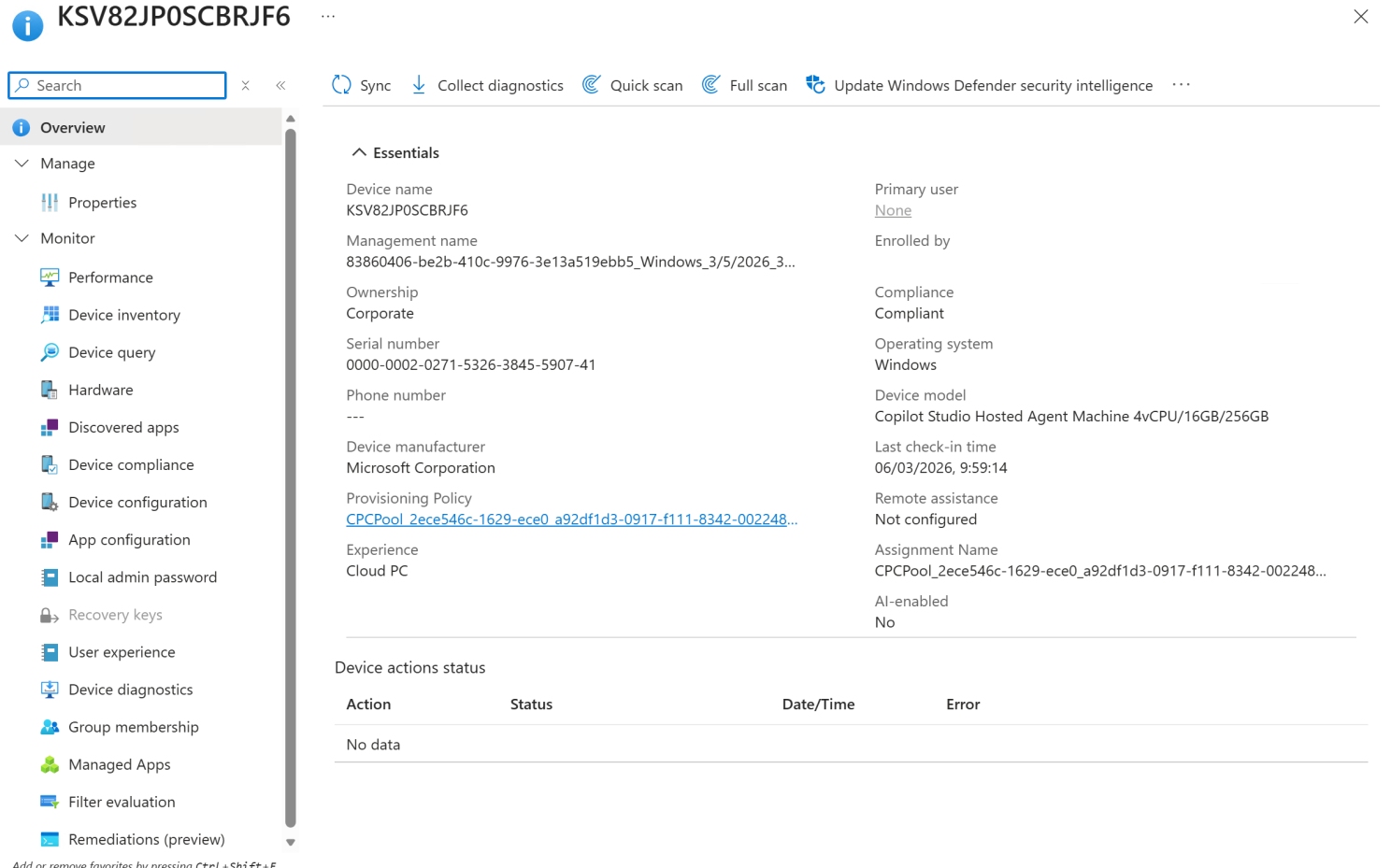
Executing the task: With the Cloud PCs online, the agent went to work. Through the platform’s interface, I could observe the agent’s actions on the Cloud PC in real time. A live feed showed the agent opening a web browser, navigating to the retailer’s website, and performing each step of the stock check process, just as I had instructed. Windows 365 for Agents provides real-time visualisation and even allows a human operator to take control if needed. (For instance, if the site prompted for a one-time password or captcha, I could intervene, then hand back control.) In my case, no intervention was needed. The agent autonomously stepped through the workflow: entered the product code, selected a size, read the stock status text on the page, and recorded the result. It repeated this for each item on my list.

After the run, the output was exactly what I hoped for: a report of which item variations were in stock and which were not. The entire process ran unattended on a Cloud PC, after which the agent automatically checked the Cloud PC back into the pool for reuse. From start to finish, what might have taken a person a couple of minutes of clicking was done in seconds by AI. The cost was minimal thanks to Microsoft’s usage-based pricing. And importantly, all of this happened within our controlled cloud environment; no data or credentials were exposed on unmanaged machines.

Key benefits of running AI Agents on Cloud PCs
Having tried this approach, I want to highlight why running AI agents inside Windows 365 Cloud PCs is so powerful and how it addresses concerns around enterprise use of AI:
- Security & Compliance Built‑In: Unlike bots running on ad-hoc infrastructure, an agent in a Windows 365 Cloud PC operates within enterprise security boundaries by design. In our case, the agent’s Cloud PCs were Entra ID–joined and governed by all our Intune policies from the moment they launched. This includes Conditional Access, Defender for Endpoint, Purview DLP, and device compliance checks.
- Scalable & Efficient by Design: One of the most impressive aspects I found is the system's elasticity. Agents draw from a shared pool of Cloud PCs instead of each agent needing a dedicated, always-on VM. This pool model means that if I ramp up my scenario tomorrow to check thousands of products or run multiple agents in parallel, Windows 365 can automatically provision additional Cloud PCs to meet the demand, then scale them back down when done. In traditional automation solutions, scaling up often means significant manual setup or over-provisioning, but here it’s essentially on-demand.
- Operational Familiarity: From an IT operations perspective, introducing AI agents via Cloud PCs didn't add complexity. No new management tools or processes were required. Cloud PCs show up in Intune just like our standard Windows 365 Enterprise PCs, so our IT admins can apply existing knowledge to manage them. Software deployments, configuration changes, and even compliance policy updates can be pushed to agent Cloud PCs using the same Intune interface and workflows we use for employees’ machines. This is a huge plus; it lowers the barrier to adoption because IT doesn’t have to learn a whole new system to accommodate AI automation.
- Observability & Control: A significant lesson from this project was the importance of being able to monitor and trust the AI agent's actions. Windows 365 for Agents has built-in observability tools that give me peace of mind during the agent’s run. I had access to real-time visuals, essentially watching the agent’s Cloud PC screen as it worked and could even step in with a mouse and keyboard if something looked off. For instance, if the website had thrown up an unexpected login prompt, I could temporarily take over the session to handle it and then let the agent continue.
From novelty to normality
What I’ve learned so far is that running AI agents on Windows 365 Cloud PCs is more than just a cool demo; it’s a practical architecture for safe, scalable automation. Microsoft’s investment in this “agentic” computing model suggests that it sees autonomous agents becoming the new normal in the enterprise IT landscape. After this experience, I can see why. We now have the means to give AI agents the tools and environment they need to act on our behalf, while still holding them to the same standards we apply to human employees in terms of security, compliance, and oversight.
For leaders and technical professionals, the takeaway is that these agents are moving from hype to real operational assets. We can provision, govern, and audit them just like we do with employees or contractors. In my example, the agent delivered tangible productivity gains, an end-to-end mundane task was automated, and it did so within the full IT governance framework we already trust.
Next steps: Encouraged by the success of this pilot, I plan to explore more complex workflows with Windows 365 for Agents. The potential applications are vast, from automated testing to customer support triage and beyond. Each new agent will, of course, go through the same scrutiny (security reviews, pilot runs with monitoring) as any new employee or system would. But with the maturity of the Cloud PC platform backing it, I’m optimistic that we can responsibly scale up our use of AI agents. This experience has shown me that the promise of AI-driven automation can be realised without sacrificing the governance and control that enterprises require. That’s a compelling combination, and I’m excited to continue this journey and share more of what I learn along the way.