Imagine delegating your most tedious computer tasks to a digital helper that works as if it were a human colleague, but this time it’s faster and works tirelessly. This is the promise of Windows 365 for Agents.
Announced at Ignite 2025, Windows 365 for Agents is a new class of Cloud PC designed specifically for autonomous AI “computer-use agents”. It allows AI-driven software to log in to a Cloud PC, run applications, click buttons, and carry out complex workflows on your behalf, even for apps that lack APIs. By giving AI agents their own secure Cloud PCs to work in, Microsoft has opened the door to software that can control other software, turning your IT environment into a launchpad for next-level automation.
Recently, at Microsoft events I attended, Computer-Use-Agents (also known as CUAs) were highlighted as a game-changer for workplace productivity and IT innovation. Make no mistake about it, this is Microsoft’s next big bet for AI. Microsoft experts described how Windows 365 for Agents will revolutionise automation and empower End User Computing (EUC) teams to become the automation heroes of their organisations. Before diving into the details, let’s summarise the key ideas:
The next step in Workplace Automation
We are on the cusp of a new chapter in enterprise IT: a world where people will use agents to control legacy applications on their behalf. This modern abstraction, essentially letting AI handle the drudge work, promises that employees are free to spend more time on high-value tasks while delegating repetitive, non-value-adding chores to digital agents.
In fact, industry analysts predict explosive growth: IDC foresees up to 1.3 billion AI agents in operation by 2028. These agents will take many forms, but a common challenge is emerging: how do we safely deploy and manage autonomous agents at scale in a workplace environment?
Microsoft’s answer is Windows 365 for Agents, a platform that marries its Cloud PC technology with the power of AI. Windows 365, launched in 2021, reimagined the Windows PC as a service, streaming a full personal Windows desktop from the cloud to any device. Building on this success, Windows 365 for agents is poised to become the next leap forward, enabling secure, scalable automation through AI-driven Cloud PCs. At the Microsoft Ignite 2025 conference, the company unveiled Windows 365 for Agents in public preview, signalling a major commitment to AI in the enterprise stack.
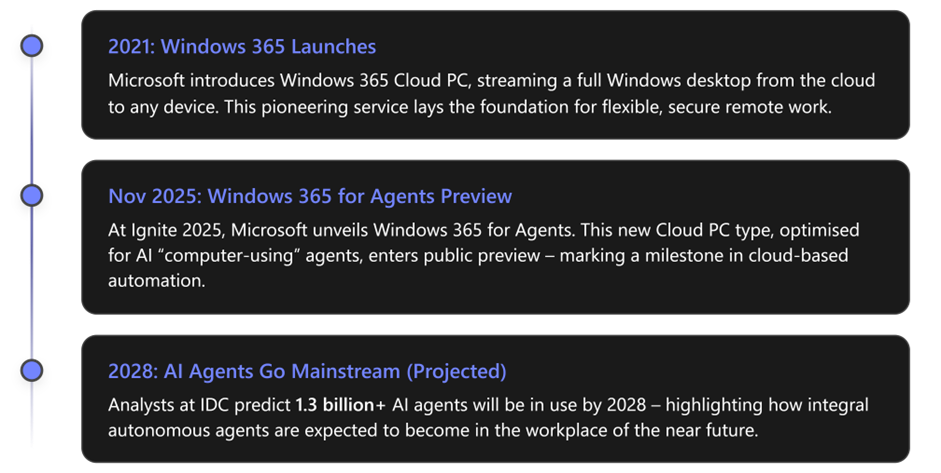
Timeline of Windows 365 for Agents
What are Windows 365 Agents?
Windows 365 for Agents are essentially cloud-hosted workers. They combine cloud PC technology with an AI “agent” to automate tasks. In practical terms, a Windows 365 agent is an autonomous AI program that can log into a Cloud PC, launch applications, and perform actions on them, all on behalf of a user. These Cloud PCs reside in Microsoft’s cloud but are fully managed by your organisation’s security and identity controls (via Microsoft Entra ID and Intune), just like any other Windows 365 PC. The key difference is that instead of serving a human employee through a remote desktop, these Cloud PCs are dedicated to running AI-driven processes, or “agentic” workloads.
How it works: When an AI agent needs to perform a job, such as process a batch of invoices or update entries in a legacy system, it will “check out” a Cloud PC from a shared pool, do the work, then “check in” the Cloud PC when done. This check-in/check-out model means the Cloud PC is used only for the duration of the task and then immediately freed up for the next job or another agent’s use. The result is excellent resource efficiency and a new pay-as-you-go billing model (about $0.40 per hour of Cloud PC use in preview), so you only pay when agents are actually running tasks. This is a shift from traditional per-user, per-month licensing for virtual desktops to consumption-based pricing tied to automation work.
Because Windows 365 for Agents run on Microsoft’s managed Azure infrastructure, organisations don’t have to worry about provisioning or maintaining the underlying servers; the Cloud PCs spin up on demand via APIs whenever agent work is requested. Microsoft’s platform handles the heavy lifting of capacity, load balancing (via elastic host pools of Cloud PCs), and integration with corporate networks and policies.
In essence, Windows 365 for Agents extends the same Cloud PC environment that employees use and trust to autonomous digital agents. This approach keeps agent activities within the organisation’s security perimeter. For example, agents use enterprise Entra ID identities, abide by Intune compliance policies, and operate with least-privilege access, just like a regular user account. All agent actions can be logged and audited separately from human users, thanks to each agent having a unique Entra Agent ID for traceability.
What’s truly innovative is that these agents are “computer-using”. Rather than requiring an API or direct data integration, a Windows 365 agent can use software through the graphical interface, viewing the screen, clicking menus, and typing input, just as a person would. Microsoft’s use of AI and computer vision means these agents aren’t thrown off by minor interface changes, unlike traditional scripted bots. They can interpret on-screen content and adjust their actions intelligently, making them far more resilient and adaptable for automating apps that weren’t designed for automation.
To put it simply, Windows 365 for Agents are digital workers that run in the cloud within a controlled Windows environment to carry out tasks on our behalf. Next, let’s explore what that means for businesses.
What can Windows 365 Agents do for customers?
Windows 365 for Agents opens exciting possibilities for organisations to work smarter and more efficiently:
Automate complex workflows: Perhaps the biggest promise is the ability to automate multi-step processes across disparate apps. With a Windows 365 agent, a company can string together tasks that used to require human intervention across several systems. Routine processes such as generating reports, performing data entry, or migrating data between legacy apps can be offloaded to agents that work 24/7 without errors or fatigue. For example, Microsoft demonstrated an expense-report agent: an employee can command the agent to fill out an expense form, and the agent launches the expense application on a Cloud PC, navigates the UI, and enters all required data autonomously. The human user can watch the agent’s progress in real time and even step in if needed, while an audit log records every action the agent takes. This means time-consuming chores get done faster, freeing employees to focus on more valuable work.
Bridge gaps where no API exists: Many business-critical applications (especially older or specialised ones) don’t offer modern APIs for integration. In the past, that meant no easy automation. Windows 365 for Agents solve this by using AI to interact with applications exactly as a person would – no API required. They can click buttons, copy data between windows, download reports, or update records in systems that never exposed a developer interface. This essentially extends automation to any software that a human can operate. If an employee can do it on-screen, an AI agent can be taught to do the same, making previously automatable tasks fair game for streamlining.
Scale operations without extra headcount: Because these agents run on demand in the cloud, organisations can scale up their “digital workforce” whenever needed. If workload spikes, you can dispatch dozens of Cloud PC agents in parallel to handle the load, something that is impossible by relying solely on your human team. This allows businesses to grow and take on more work without immediately adding staff, or to handle after-hours/night-time processes automatically. For example, imagine a retail company that needs to process thousands of orders overnight; AI agents could log in to the relevant systems and process them in parallel, so by morning, everything is completed. This elasticity is built in – as Microsoft puts it, “doing this in the cloud gives you security as well as elasticity” when scaling agent workloads.
Maintain enterprise-grade security & compliance: A critical benefit is that all this automation happens within your governed IT environment, not on some mystery box under a desk. Each Windows 365 agent Cloud PC is subject to the same security policies, identity controls, and compliance configurations as any corporate device. Nothing the agent does bypasses audit trails; in fact, it improves oversight, since you can distinctly log what an agent did versus a human user via its unique credentials. Sensitive tasks can be automated with confidence because the agent cannot access anything it shouldn’t (thanks to Entra ID’s role-based access and conditional access policies). If an agent ever behaves unexpectedly, IT can simply revoke its session.
Boost productivity & innovation: When employees are supported by AI agents handling the busywork, they can achieve more strategic outcomes. Early adopters report significant productivity gains. Microsoft’s own Copilot team, for instance, uses Windows 365 for Agents behind the scenes in features like Copilot Studio’s web automation and Project Opal (a forthcoming AI workflow assistant in Microsoft 365 Copilot). These examples show that complex knowledge-work tasks (like researching across websites or cross-posting data between apps) can be accelerated with agent assistance. Over time, organisations will build libraries of custom agents, e.g., a “Finance Agent” to reconcile invoices or an “HR Onboarding Agent” to set up accounts – amplifying every department’s output. By deploying Windows 365 for Agents, customers can expect faster cycle times, fewer errors, and newfound agility in responding to business needs.
To better understand how Windows 365 for Agents differ from older approaches, let’s compare it with RPA (Robotic Process Automation) bots that some businesses have used for UI automation:

Traditional RPA Bots vs CUAs
EUC Teams at the forefront of the Automation Revolution
One of the most exciting aspects of Windows 365 for Agents is how it elevates the roles of IT and end-user computing teams. In the past, enterprise automation efforts (such as RPA or scripting tools) sometimes lived in disparate parts of the organisation or were driven by business units without central IT oversight. Now, Windows 365 for Agents brings automation into the same fold as device management. It means your EUC team can provision, monitor, and govern AI agent sessions just as they do standard user devices throughout Intune. There’s no steep learning curve or new infrastructure to stand up; an agent’s Cloud PC is essentially another device in your environment, albeit one that software instead of a human uses.
This puts EUC professionals in a unique and empowering position. With minimal extra effort, they can enable cutting-edge AI automation for the entire business. The Cloud PC admin who once only managed laptops and VDI clients can now also manage fleets of AI-driven Cloud PCs executing critical tasks. All the hard-won expertise in policy management, security compliance, and IT governance that EUC teams possess becomes directly applicable to the AI agent domain. In effect, and quoting Sam Duncan-Brown, “EUC and device management teams can become the heroes of automation in their organisations”, delivering powerful new capabilities to departments while ensuring everything remains secure and compliant.
At recent Microsoft partner briefings, this message came through loud and clear: Windows 365 for Agents are a way to turn your trusted device administrators into “automation heroes”, providing them with a platform that they control. In contrast, developers and “agent makers” focus on the logic of automating work. With Windows 365, that vision is now within reach: the same tools used to manage human users’ PCs can also manage AI worker environments.
The road ahead: Why this matters
In summary, Windows 365 for Agents represent a significant leap in how we think about automation and workplace technology. They combine the strengths of cloud computing, AI, and enterprise security into a single solution that can literally take over a keyboard and mouse to get work done. This innovation is coming at a crucial time: organisations everywhere need to boost productivity and do more with less, and employees are eager to offload repetitive digital tasks. By introducing a secure, scalable way to deploy computer-using AI agents, Microsoft is effectively offering “autopilot for the digital workforce.”
Of course, this journey is just beginning. Windows 365 for Agents is currently in preview, with Microsoft already working alongside early adopters and partners to refine the offering. As with any new technology, we can expect a learning curve – some industry watchers predict that adoption will start gradually until organisations see it proven at scale. But the momentum is building: multiple solution providers (Manus AI, Genspark, and others) are already exploring how to leverage Windows 365 for Agents within their AI solutions.
Microsoft’s future vision is clear. We’re looking toward a future where humans and AI agents work hand in hand, each doing what they do best.
Routine digital tasks will be offloaded to reliable Agents that operate under the watchful eye of IT. Employees, freed from boring, repetitive work, will focus on creativity, strategy, and tasks that require human insight. Then, behind the scenes, EUC and IT teams will be key in ensuring that the IT systems are operational, using Windows 365 to provide secure cloud desktops where agents live and work. Just as PCs and cloud apps transformed business in past decades, autonomous agents may define the next decade of workplace innovation.
As you consider your organisation’s automation strategy, keep an eye on Windows 365 for agents, which have the potential to make every application, even those without APIs or modern integrations, part of your automation story.
It’s a chance to reimagine processes and ask, “Which tasks could we hand over to an agent?” The answers might surprise you.
By embracing Windows 365 for agents early, companies can stay ahead of the curve and ensure that when AI agents become the norm, they’ll already have a secure, well-managed infrastructure ready for them. In the not-too-distant future, your business’s most diligent “employee” might not be human at all; it could be a Cloud PC in the sky, tirelessly working through the night, turning your backlog into done tasks by morning. That’s the new world of work that’s coming, and Windows 365 for agents are a key step toward making it a reality.