Imagine someone is working from home, updates their password, then restarts their laptop. On a traditional domain‑joined or hybrid‑joined device, the next sign‑in often turns into a frustrating mix of cached credentials, waiting for a VPN to kick in, and hoping the device can reach a domain controller at just the right moment. Now picture that same experience happening across hundreds or even thousands of remote staff. It quickly stops feeling like a small inconvenience and becomes a real risk for both usability and security.
This is where Microsoft Entra‑joined devices really stand out. Instead of relying on a traditional Active Directory (AD) domain, these devices authenticate directly with Microsoft Entra ID over the internet, which means users can sign in with their most up‑to‑date credentials from anywhere across the world. Sign-ins often take seconds with a cloud-native device vs minutes with hybrid-joined. There is no waiting for a VPN to connect and no dependency on a domain controller being available at the right moment. On top of that, security features like Conditional Access evaluate consistent cloud signals every time, so protections stay reliable and predictable. The result is simple: fewer surprises and stronger security across the board.
At a high level, cloud-native Entra Join offers:
- Simpler device identity: One primary cloud identity (Entra ID) for the device, reducing complexity.
- Reduced legacy dependency: Less reliance on on-premises servers and outdated trust protocols.
- Consistent Conditional Access: Cleaner compliance and risk signals, allowing stricter policies with fewer exceptions.
- Better remote UX: Fewer “it only works on VPN” issues for users outside the office network.
- Cloud-first innovations: New Windows and Intune features (e.g. passwordless sign-in, zero-touch provisioning) often work best on Entra-joined devices.
- Hybrid still has a niche: Hybrid join is still useful in rare cases where old-school Active Directory (AD) machine authentication is absolutely required, but those situations are increasingly uncommon.
Entra Join vs. Hybrid Join: At a Glance
For a quick comparison, the table below highlights key differences between Entra Joined (cloud-only) devices and Hybrid Joined (on-premises + cloud) devices:
Aspect | Entra Joined (Cloud-Only) | Hybrid Joined (On-Prem + Cloud) |
|---|
Identity & Trust | Single cloud device identity in Entra ID as source of truth; simpler trust chain. | Two device identities (AD + Entra ID) creating dual trust paths to manage. |
Attack Surface | Smaller attack surface with fewer legacy components in the device’s trust path. | Broader attack surface; on-prem AD and cloud components both need securing. |
Conditional Access | Consistent device identity and compliance signals from the cloud; policies are simpler and more reliable. | Works with Conditional Access, but dual identities and edge cases add complexity and exceptions. |
Infrastructure | You hardly need any on-premises infrastructure, and routine tasks don't rely on connecting to a domain controller. | Requires periodic line-of-sight to AD domain controllers for key scenarios (password changes, etc.). |
Policy Delivery | Cloud policies with Intune MDM work anywhere there's an internet connection, keeping devices quick to update and always current. | Group Policies (GPO) require corporate network access; remote machines may get updates slowly or unpredictably. |
Modern Features | Cloud-first features are fully supported (e.g. Windows Autopilot enhancements, web-based MFA sign-in). | Some modern capabilities need complicated workarounds or revert to legacy methods. |
Here are six main reasons cloud-only Entra Joined devices are usually safer and more reliable than hybrid-joined ones:
1. A Simpler, Stronger Trust Model
Hybrid joining a device means it has two separate identities, one in on-premises AD and one in Entra ID, doubling the complexity and creating more places where trust can break. Entra-joined devices reduce this down to one cloud identity, making the trust model easier to understand, secure, and troubleshoot. In practice, this simplification leads to far fewer “mystery failures” during sign-in or when obtaining tokens, especially for users off-network.
Cloud Kerberos Trust: Modern SSO Without Hybrid Join – A common concern about going cloud-only is, “Will we still have seamless single sign-on (SSO) to legacy, on-prem apps and file shares?” The answer today is yes. With Cloud Kerberos Trust, Entra-joined devices can access traditional on-premises Kerberos-protected resources (like file servers or older applications) without being domain-joined at all. The trust relationship is established between Microsoft Entra ID and your on-prem AD in the backend. In effect:
- Cloud-native devices can achieve seamless SSO to on-prem resources.
- You avoid having to maintain dual device identities for each machine.
- The “blast radius” of any on-prem AD breach is reduced, because endpoints no longer have full machine accounts in AD.
For many organisations, Cloud Kerberos Trust eliminates one of the last technical reasons to keep using Hybrid Join as the default.
2. Conditional Access Becomes a True Gatekeeper
Microsoft’s Conditional Access (CA) works best when it can evaluate consistent signals about a login: the user’s identity, device health compliance, risk level, location, session, etc. With Entra-joined devices, those signals all align cleanly in the cloud. The device’s identity and compliance state are both verified through Entra ID, so CA policies can be made very strict without hitting weird exceptions.
Hybrid-joined devices can still be protected by Conditional Access, but their dual identity nature can introduce odd edge cases. For example, a policy might get bypassed because the device’s AD identity isn’t recognised in a cloud-only conditional check, or additional workarounds might be needed to account for the on-prem side. This complexity often leads to weaker rules or “policy drift” over time.
Windows Hello for Business: This is Microsoft’s passwordless authentication system using biometrics or PIN. It works best in a cloud-native model. On Entra-joined devices, Windows Hello for Business is definitely the best way to login. It’s backed by strong, phishing-resistant credentials (like hardware TPM keys) and its signals are fully understood by Conditional Access. While Windows Hello can be made to work on hybrid-joined devices, the experience in a purely cloud-joined scenario is:
- Easier to deploy and manage (fewer prerequisites and networking hoops to jump through).
- More consistent behavior (no mystery misfires depending on whether you’re on an office network or VPN).
- Less dependent on domain controller connectivity, so it works wherever you are.
The benefit is faster sign-ins for users, stronger credential protection, and fewer odd cases where authentication fails depending on location.
3. Less Legacy Infrastructure (Technical Debt)
Every on-premises component you rely on (like domain controllers, Entra Connect sync servers, certificate authorities, file and app servers) is another thing that needs to be secured, maintained, and kept available. Hybrid Join necessarily pulls those legacy pieces into your endpoint security story. In fact, Microsoft’s documentation notes that hybrid-joined devices require periodic on-prem network connectivity, and if that’s a concern, Entra Join should be used as an alternative. Most companies we work with end up deploying an Always On VPN which comes with its own costs and maintenance.
By reducing dependence on on-premises infrastructure, Entra Join reduces the number of high-value targets an attacker could try to exploit. Fewer servers and trust links in the authentication chain means fewer avenues for attack and fewer things that can go wrong. It also simplifies operations as there are less servers for IT to patch, and fewer connectivity points to troubleshoot when something goes wrong.
4. Faster Policy Enforcement for Modern Work
Relying on traditional Group Policy (GPO) for settings means a device must periodically talk to a domain controller over the network to get policy updates. If a laptop hasn’t been on VPN or in the office, it might drift out of compliance simply because it missed some GPO updates. This creates a lag between when IT thinks a security setting is in place and when it reaches remote machines (if it ever does!).
With cloud-managed policies via Intune, policy enforcement is much faster and more consistent. The moment a device comes online (anywhere in the world), it receives updated configuration from the cloud. Entra-joined devices, by design, live in this model. They get their policies anywhere, anytime as long as they have an internet connection, which means even travelling users stay up-to-date with the latest security configuration and updates. In short, Entra-joined endpoints tend to stay closer to your intended security baseline over time, whereas hybrid ones might lag behind if they’re often off-network.
5. Cloud-Only Capabilities Keep Growing
An often-overlooked advantage of going cloud-native is being ready for the latest and greatest features. Many new Windows and Intune capabilities are exclusive to, or at least smoother on, Entra-joined devices. For example:
- Autopilot enhancements: Zero-touch provisioning scenarios, such as Windows Autopilot’s self-deploying mode, will only work on Entra-joined machines.
- Passwordless enablement: Whilst hybrid-join can support Passwordless, Entra-Join is built for it natively. Entra‑joined devices bind the device directly to the cloud identity, giving you device-bound phishing resistant sign in methods such as FIDO2 tokens or Windows Hello for Business.
- Security and management features arrive sooner: Microsoft now releases many of its newest identity, security, and device management improvements to Entra‑joined devices first. This means organisations that embrace a cloud‑native identity model get early access to things like richer Conditional Access controls, device‑bound Entra passkeys, and smoother platform SSO experiences, giving them stronger protection and better tools first.
The direction is clear. Microsoft is innovating for cloud-first environments.
By shifting to a cloud‑native identity model, you put your devices and users in the best position to take advantage of these improvements as soon as they are released, rather than playing catch‑up later.
6. Faster, More Reliable PC Provisioning (Autopilot Builds)
If you’ve ever rolled out devices using Windows Autopilot, you’ll know that speed and reliability during setup are crucial. Here, Entra join has a clear advantage. When a device is Entra-joined:
- Its cloud identity in Entra ID is created immediately during provisioning.
- Policy targeting and app installations can begin right away.
- There’s no delay waiting for an on-prem AD computer object to sync up to the cloud.
In contrast, Hybrid Autopilot device builds inevitably introduce a far more lengthy and complex build process. The device must register into on-prem AD, then Entra ID Connect needs to sync that object to Entra ID (which can take up to 30mins), and any hiccup in that sequence can delay or corrupt the whole process. In real-world deployments, this often translates to:
- Longer build times – It simply takes more time to go through additional steps and waiting periods.
- Less predictable provisioning – More moving parts mean more chances for something to go wrong (“just wait 20 minutes and try again” is not what you want to hear during a deployment!).
- Hands-on troubleshooting – Admins might need to manually intervene or restart steps if syncs haven’t occurred in the right order.
For organisations aiming for true zero-touch and fully automated builds, going cloud-only with Entra join makes the process a whole lot smoother and faster. It reduces those “watching paint dry” moments during setup and gets devices into users’ hands more reliably. Often, clients simply ship devices straight from the supplier to users at home for true zero-touch deployment.
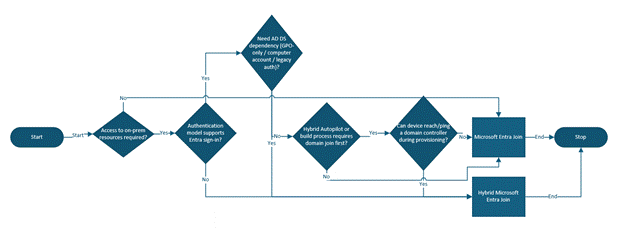
Decision Tree
Frequently Asked Questions (FAQ)
Q: Can Entra-joined devices really access on-prem resources securely?
A: Yes. Features like Cloud Kerberos Trust and Windows Hello for Business enable secure, modern authentication to many on-premises resources without requiring hybrid join. A cloud-joined computer can still obtain tickets or tokens to access legacy file shares and applications, thanks to Entra ID working in tandem with your on-prem AD behind the scenes.
Q: Why do password changes feel smoother on Entra-joined devices?
A: Because the device authenticates directly with Entra ID over the internet. The moment you change your password in the cloud, your Entra-joined PC knows about it. There’s no dependency on the laptop finding a domain controller at the right time or syncing through a VPN. The next login uses your new credentials without drama.
Q: When does Hybrid Join still make sense?
A: Hybrid join is still viable when you have specific, hard dependencies on traditional Active Directory – for example, certain legacy applications or management tools that absolutely require the computer to be a domain member, or scenarios with on-prem PKI certificates tied to machine identity. In these cases, hybrid join can be a temporary solution. However, treat it as a transition, not a destination. The strategic goal for most organisations should be to modernise those dependencies and move to a cloud-native model in the long run.
Conclusion and Key Takeaways
In summary, shifting to Entra-joined (cloud-only) devices returns a simpler, more robust security posture and a better experience for users, especially in a world of remote and hybrid work. With a single cloud-based device identity, IT teams have fewer headaches and fewer vulnerabilities to worry about. Conditional Access and other security controls work more consistently, and users enjoy seamless access without the quirky “on VPN/off VPN” issues.
Hybrid-joined devices still have their place in the short term for certain legacy needs, but they come with extra baggage that is increasingly hard to justify. If your organisation is still predominantly hybrid joined, consider this a call to action: plan your road to cloud-native Entra join. By doing so, you’ll reduce dependence on old infrastructure, unlock modern features, and position your endpoint environment for the future. The benefits in security, reliability, and agility make Entra join the smarter choice for most scenarios moving forward.
At Advania, we’ve worked with organisations of all shapes and sizes to help streamline their move to cloud-native device management, guiding them through the practical realities and common roadblocks. Our consultancy team brings hands-on experience from countless deployments, meaning we know what works (and what doesn’t) in the real world. If you’re curious but hesitant about shifting to Entra join, why not start with a proof of concept? We’ll configure an Entra-joined device for you to trial in your own environment, so you can see the benefits first-hand before making any big decisions.
Further Reading: If you’d like to explore more on this topic or need implementation guidance, check out these resources:

